

A town worth taking your time in.
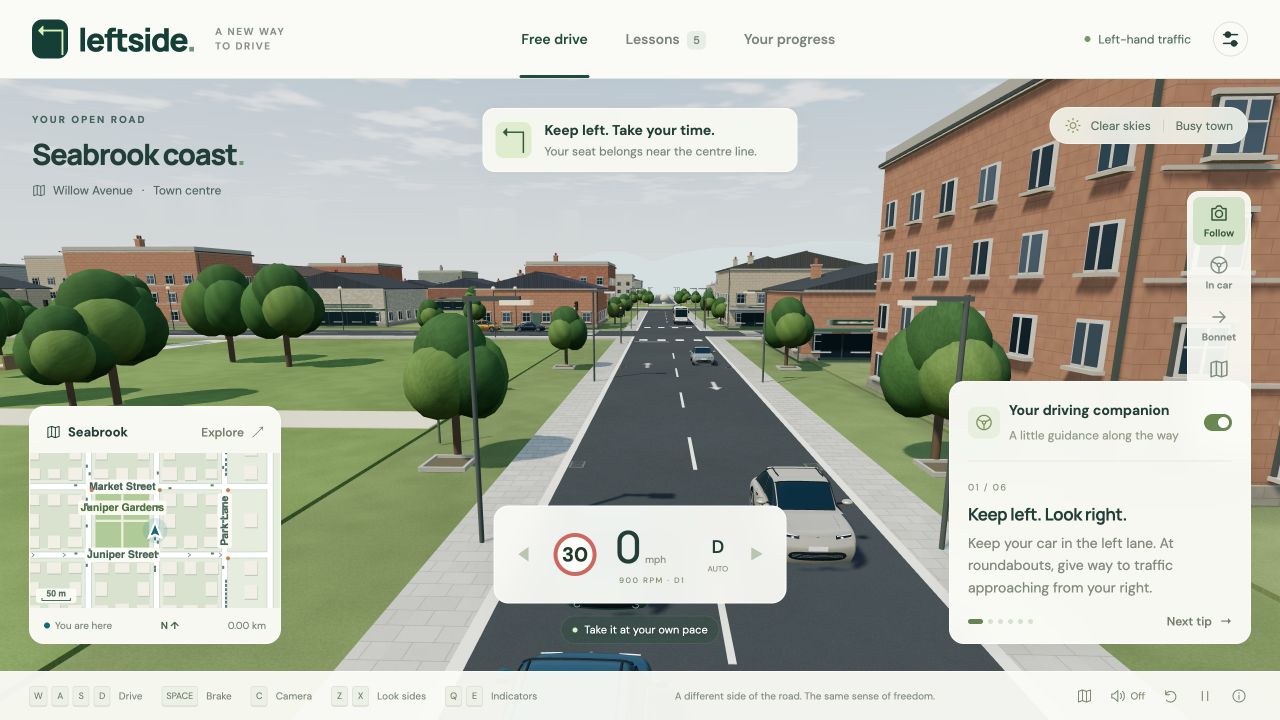
Connected streets, a coastal circuit, roundabouts and an elevated motorway. Follow the live map or see where the road takes you.
ORA SU iOS E ANDROIDLeft Side Driving Simulator
FREE 3D DRIVING SIMULATOR
Drive a right-hand-drive car in a virtual town. Practise lane position, junctions, roundabouts and motorways with five guided lessons.
Prova un minuto gratis · Funziona nel browser · Nessun download
LEFT-HAND TRAFFIC.
RIGHT-HAND-DRIVE CAR.
05 Guided lessons
04 Camera views
Your pace Open-world free drive
Keep left Abitacolo con guida a destra
A DIFFERENT SIDE OF THE ROAD
Esercitati a guidare a sinistra in un simulatore 3D nel browser. Prova un minuto gratis, poi acquista l’accesso completo.
For travellers, people moving to a left-driving country, or anyone curious about a new perspective, it’s a place to explore before getting behind a real wheel.
Meet the simulatorConnected streets, a coastal circuit, roundabouts and an elevated motorway. Follow the live map or see where the road takes you.
Switch between the right-hand-drive cockpit, follow, bonnet and aerial views. Use keyboard controls or on-screen touch pedals.
Optional coaching responds to lane position, speed, signals and collisions. Adjust traffic, lighting and graphics to suit your practice.
FIVE SMALL STEPS
Choose a skill. Take your time.
Come back whenever you like.
Get a feel for your place on the road. Follow the left lane for 300 metres.
Ease to a stop at a red light, wait for green, then move through the junction.
Practise a clockwise route, giving way and signalling left as you exit.
Read the arrows and follow Juniper Street in the correct direction.
Join the wider road and practise keeping left at motorway speeds.
Your completed lessons and progress stay in this browser, on this device.
READY WHEN YOU ARE
No setup. Just a browser with WebGL support.
A larger screen and keyboard are ideal.
Open the simulator and choose Start driving. Begin with a quiet free drive, or pick a guided lesson above.
W to accelerate, S to brake, A D to steer. On touch screens, use the steering and pedal buttons.
Use C to change your view and R to reset. Explore the map with M. There’s no rush.
PLAN YOUR FIRST REAL DRIVE
Prepare for driving in the UK: mph speed signs, roundabouts, motorway lanes, overseas licences and a practical first-drive plan for your rental car.
Leggi la guida pratica Guida di destinazioneA visitor’s guide to driving in Ireland: km/h signs, narrow rural roads, the M50 toll, the Northern Ireland border and preparing for a rental car.
Leggi la guida pratica Guida di destinazionePrepare for an Australian rental-car trip with state-specific licence checks, roundabouts, Melbourne hook turns, rural distances and wildlife awareness.
Leggi la guida pratica Guida di destinazionePlan driving in New Zealand with practical guidance on one-lane bridges, winding roads, overseas licences, journey times and left-side practice.
Leggi la guida pratica Guida di destinazionePrepare for driving in Japan: accepted licence documents, Japanese stop signs, red lights, right turns and a realistic rental-car practice plan.
Leggi la guida pratica Guida praticaUnderstand clockwise roundabouts, approach lanes, giving way and exit signals, with a UK example and the important difference in NSW rules.
Leggi la guida pratica Guida praticaA practical first-drive checklist for a right-hand-drive rental car: seating, pedals, controls, left-edge awareness, transmission and moving off.
Leggi la guida pratica Guida praticaPrepare for an overseas rental car with a practical sequence: local rules, virtual lane and junction practice, route planning and a collection checklist.
Leggi la guida pratica Guida del simulatoreGuida pratica: Esercitati a guidare a sinistra in un simulatore 3D nel browser. Prova un minuto gratis, poi acquista l’accesso completo.
Leggi la guida praticaBEFORE YOU SET OFF
Esercitati a guidare a sinistra in un simulatore 3D nel browser. Prova un minuto gratis, poi acquista l’accesso completo.
Un minuto di guida gratuita, poi un unico pagamento per l’accesso completo. Nessun abbonamento.
You can use Leftside to explore left-hand lane position, clockwise roundabouts, junctions and motorway driving in a virtual setting. It uses UK-style conventions, but Seabrook is fictional. It is not an official driving course, a driving test or a substitute for instruction and the current Highway Code.
Leftside includes on-screen steering and pedal controls for touch devices. Landscape orientation gives you more room. You need a browser with WebGL support; performance depends on your device. A keyboard and larger screen offer more precise controls.
The five guided lessons cover staying in the left lane, stopping at red lights, roundabouts, one-way streets and motorway driving. Free drive lets you explore connected town roads, a coastal circuit and motorway slip roads at your own pace.
No. Left-hand traffic means vehicles travel on the left side of the road. A right-hand-drive car has its steering wheel on the right. Leftside combines left-hand traffic with a right-hand-drive cockpit.
Leftside is a simplified practice simulator for building familiarity. Its traffic and vehicle dynamics do not reproduce every real-world hazard, and it does not assess whether you are ready to drive. Use qualified instruction and official local guidance for real driving.
I progressi restano su questo dispositivo. Ripristina l’accesso acquistato su un altro dispositivo con la stessa e-mail verificata.
THE LEFT LANE IS CALLING
Un minuto di guida gratuita, poi un unico pagamento per l’accesso completo. Nessun abbonamento.